Minelab X-Terra
Minelab X-Terra Pro Settings By Site Type: Park, Field And Beach Modes In Practice
Quick answer
Minelab gives the X-Terra Pro two Park, two Field and two Beach modes. Choose the pair built for your ground, select a frequency to suit the target class, set sensitivity by ear rather than by the number, ground balance whenever the soil changes, and change one setting at a time.
The Minelab X-Terra Pro is a short menu machine, and that is its strength. Minelab publishes two Park, two Field and two Beach pre programmed search modes, five audio modes, 30 discrimination segments, a control pod flashlight and handgrip vibration, and an IP68 rating to 16 feet. There is not much to get lost in, which means most owners can learn the whole machine in a season rather than skimming the surface of a deeper one.
What follows is a site by site starting point. It is method rather than magic numbers, because the correct sensitivity for your ground on a given day is whatever your machine runs quietly at, and nobody publishing a page can know that. Work down to your site, start where the table says, and change one thing at a time.
Top pick
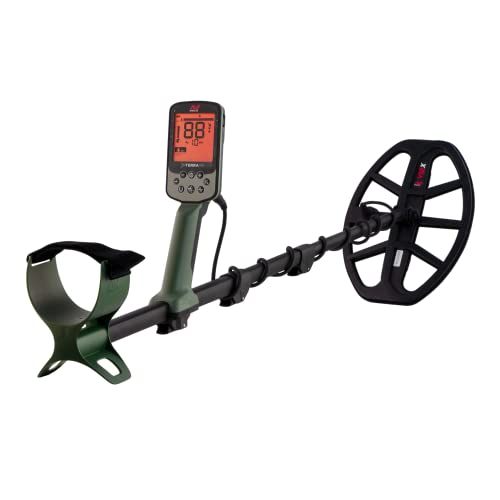
Minelab X-Terra Pro
Six pre programmed modes covering park, field and beach in a machine Minelab rates IP68 to 16 feet at 2.9 pounds.
Price was accurate when this page was compiled and changes often.
On this page
What do the paired modes give you?
Minelab supplies the modes in pairs because most ground presents two distinct problems. One member of each pair leans toward separation and speed for cluttered ground. The other leans toward depth and stability for cleaner ground. Park, Field and Beach then set the broad configuration for the kind of site you are on, including how the machine handles mineralisation and salt.
The mistake to avoid is treating the mode as the whole answer. Beach mode does not eliminate salt, it copes with it. Park mode does not eliminate trash, it gives you a configuration that separates better than the field one. The settings you make after choosing the mode, and the coil you fit, do the rest. If trash is the problem, the coil size selector is a more useful tool than the menu.
Which mode for which site?
Find your site, then read across. The first adjustment column is the thing to change before anything else.
The X-Terra Pro covers park, field and beach ground with two pre programmed modes each, and on nearly every site the first correction is sensitivity by ear and a fresh ground balance rather than a different mode.
| Site | Mode | Frequency choice | First adjustment |
|---|---|---|---|
| Busy municipal park, modern trash | Park | Mid or higher, for small target response | Smaller coil before anything in the menu |
| Old lawn, deep coins, moderate trash | Park | Lower, favouring high conductors | Sensitivity up while the machine stays quiet |
| Ploughed field, spread targets | Field | Lower for coins, higher for small hammered silver | Larger coil and a proper grid |
| Pasture and permission land | Field | Lower for depth on larger targets | Ground balance, then sensitivity by ear |
| Dry sand above the tide line | Beach | As for inland, dry sand is mild ground | Little needed beyond a balance |
| Wet sand and the surf line | Beach | As Minelab configures the beach modes | Rebalance often, drop sensitivity until stable |
| Shallow water, salt | Beach | As configured | Wired waterproof audio, since wireless does not pass through water |
| Freshwater river and lake margins | Park or Field | Mid range | Watch footing, and balance for wet ground |
Mode counts and the IP68 rating are from Minelab published material for the X-Terra Pro. Frequency and sensitivity advice is method, because the right value depends on your soil, your interference and the day.
How do you set sensitivity without a number to copy?
By ear, in three steps, and it takes ninety seconds. Hold the coil still a few inches off the ground. Raise sensitivity until the machine starts chattering. Bring it down until it goes quiet, then down one more step. That setting will change from site to site and even across a single beach as you approach the water, and it is supposed to.
The reason this beats a published number is that the limiting factor is rarely the machine. It is mineralisation, salt, wet ground and electrical interference, all of which are local to you. A stable machine two steps below its noise threshold hears faint targets you will never notice on an unstable one at maximum, because your ears stop trusting a machine that falses. The same logic sits behind the X-Terra Pro target ID chart: stability first, numbers second.
What to change when the machine misbehaves
Symptom first, then the fix. Change one thing, then listen again.
Falsing on wet sand is nearly always a ground balance and sensitivity problem rather than a mode problem, and random chatter with the coil held still is interference rather than ground.
| Symptom | Most likely cause | What to change |
|---|---|---|
| Falsing constantly on wet sand | Salt loading and stale ground balance | Rebalance, then reduce sensitivity in steps until stable |
| Chatter with the coil held still | Electrical interference | Noise cancel, change frequency, move away from the source |
| Every signal sounds the same in trash | Coil too large for the target density | Fit a smaller coil, then reassess |
| Deep targets sound thin and vanish | Sweep too fast, coil too high | Slow down, keep the coil low and level, overlap sweeps |
| Good targets appearing as iron | Iron alongside, or too much rejection | Open the discrimination, sweep from several angles |
| Machine quiet but finding nothing | Over discriminating, or the site is genuinely clean | Run a wider acceptance for ten targets and see |
Work through one row at a time. The habit that costs people whole sessions is changing four settings at once and never learning which one mattered.
Kit that changes what these settings can do
The coil does more for trash than the menu does, and the audio decides what you can hear at the water line.

Minelab EQX 06 Coil (6 inch)
$225.00Listed by Minelab as compatible with the X-Terra Pro and submersible to 16 feet with it, and built for separation in dense trash.
Best for: parks and old house sites
Check price on Amazon
Gray Ghost Amphibian Headphones for Minelab
$169.95A wired submersible set, which is the only audio that works when the machine goes under, rated to 200 feet per the listing.
Best for: surf and wading
Check price on Amazon
Minelab PRO-FIND 35
$99.00Waterproof to 10 feet per Minelab, with ferrous tone ID and five sensitivity levels for working in wet sand.
Best for: beach and riverbank recovery
Check price on AmazonHow we chose
We did not test these machines in person and we publish no find claims. Picks are researched from manufacturer specifications and owner manuals, published listing features, waterproof ratings and warranty terms, and the recurring themes in verified owner reviews. We favour the established detector brands because coils, shafts and control boxes have to stay available years after a model is discontinued, and we place every pick in the tier where its price and capability honestly belong.
Sources
- Minelab X-Terra Pro instruction manual, search modes and settings chapters
- Minelab X-Terra Pro published product specification sheet
- Manufacturer listing specifications for the X-Terra Pro, EQX 06 and PRO-FIND 35
Frequently asked questions
Is the X-Terra Pro good enough for saltwater beaches?
It is built for it in the sense that Minelab supplies beach modes and rates the machine IP68 to 16 feet, so it can be used in the water. Being a selectable single frequency machine, it works harder against conductive salt than a simultaneous multi frequency machine does. Expect to rebalance often and run lower sensitivity on wet sand than you would inland.
Which coil should I buy first for it?
A small one, if you hunt parks and old sites where iron is dense. Minelab lists the EQX 06 as compatible with the X-Terra Pro and submersible to 16 feet with it, and separation in trash is the problem the stock coil struggles with most. If you mainly walk open fields and beaches, the larger coil earns its place instead by covering more ground per sweep.
Can I use wireless headphones when I take it in the water?
No. Wireless audio does not pass through water, which catches people out every season. If you intend to submerge the machine you need a wired submersible set connected to the detector socket. It is worth having one regardless, since a wired option also removes the largest avoidable drain on any rechargeable machine on very long days.
How often should I change frequency?
Less often than the menu tempts you to. Pick the frequency that suits the targets you are chasing on that site, learn how your reference coins read on it, and stay there. Switching mid session means every number you memorised has shifted, and the only time it genuinely helps is when interference will not clear or when you deliberately change target class.
Does the vibration feature cost me anything?
Very little in battery terms, and it earns its keep in wind and surf where audio gets lost, and for anyone hard of hearing. Minelab lists handgrip vibration on both the X-Terra Pro and Elite. Most owners who try it in noisy conditions leave it on permanently, because a physical cue arrives before your ears finish arguing with the wind.
Researched, not professional advice. This page is compiled from published specifications, manuals and owner-review consensus, not hands-on testing. Target ID numbers, depth figures and settings vary with soil chemistry, moisture, target size, depth, orientation and firmware version, so treat every figure here as a starting point and verify it against your own machine's manual and your own ground. As an Amazon Associate we earn from qualifying purchases.