Minelab Manticore
Minelab Manticore Settings By Site Type: Park, Field, Beach, Salt, Relic And Gold
Quick answer
Start from the mode family Minelab built for the ground: All Terrain inland, Beach for sand, surf and seawater, Goldfield for nuggets. Then set sensitivity as high as the machine runs quietly, raise recovery speed as trash density rises, and ground balance again whenever the soil or the moisture changes.
Minelab lists ten search modes on the Minelab Manticore, grouped into All Terrain for inland detecting, Beach for sand, surf and seawater zones, and Goldfield for gold nuggets. Most owners never need more than three or four of them. The mode chooses a sensible starting point for the ground you are standing on. What you do after that with sensitivity, recovery speed, ground balance and discrimination is what separates a productive day from a noisy one.
This page is a set of starting points and a method, not a list of magic numbers. Anyone publishing a single sensitivity value for your site has not seen your soil, your electrical interference or your trash. Set the machine by what you can hear, and change one thing at a time so you know which change did what.
Top pick
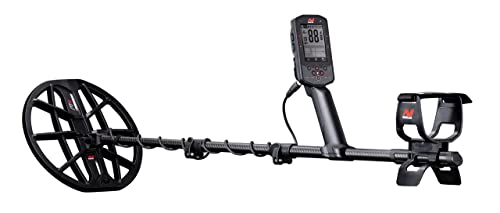
Minelab Manticore
Ten search modes across inland, beach and goldfield ground, so the same machine covers every site type on this page.
Price was accurate when this page was compiled and changes often.
On this page
What does a search mode actually change?
A search mode is a saved bundle of settings, not a different detector. It sets a starting frequency weighting, a discrimination pattern, a tone arrangement and a recovery speed that suit a broad class of ground. Choosing Beach does not make the machine waterproof or make salt disappear. It loads a configuration that copes with conductive ground better than the inland configuration does.
That matters because the most common mistake with a capable machine is changing six things at once and then not knowing which one helped. Pick the mode, run it as Minelab shipped it for a session, then adjust one parameter at a time. If you are new to the range, the intermediate setup page covers the kit that makes these adjustments worth making in the first place.
Which mode and which settings for which site?
Work down the rows to your site, then read the adjustment column as the thing to change first if the machine is unhappy.
Minelab groups the Manticore modes into All Terrain for inland ground, Beach for sand, surf and seawater, and Goldfield for nuggets, and the first adjustment on almost every site is sensitivity down or recovery speed up rather than a different mode.
| Site | Mode family | First adjustment | What usually goes wrong |
|---|---|---|---|
| Municipal park, heavy modern trash | All Terrain | Raise recovery speed, then drop coil size | Running maximum sensitivity so every tab masks a coin |
| Old lawn or school yard, mixed depth coins | All Terrain | Sensitivity as high as it stays quiet, slower recovery for depth | Too fast a recovery speed clipping deep responses |
| Ploughed field, spread targets, low trash | All Terrain | Larger coil and full sensitivity | Wasting the day walking instead of gridding the field |
| Dry beach sand above the high tide line | Beach | Little needed, ground balance and go | Assuming dry sand needs the salt configuration |
| Wet beach sand and the surf line | Beach | Ground balance often, reduce sensitivity until stable | Chasing falses caused by salt rather than reducing sensitivity |
| In the water, saltwater | Beach | Lower sensitivity, wired waterproof audio | Wireless headphones, which do not work under water |
| Relic ground, dense iron, mineralised soil | All Terrain | Raise recovery speed, open up the iron so you can hear it | Discriminating iron away and losing the coins beside it |
| Known goldfield, small nuggets | Goldfield | Ground balance carefully, smallest sensible coil | Using a coin configuration and hearing nothing |
Mode names and groupings follow Minelab published material for the Manticore. The adjustments are method rather than published values, because the correct sensitivity setting is whatever your machine runs quietly at on your ground on the day.
How high should sensitivity actually go?
Set it by ear. Raise sensitivity until the machine starts chattering with the coil held still and slightly off the ground, then back it down until it is quiet, then back it down a little further for comfort. A machine running two steps below its noisy point will find more than a machine running at maximum and falsing on every sweep, because you will stop trusting the maximum setting within ten minutes and start ignoring signals.
Electrical interference deserves its own step. Run the noise cancel routine when you arrive, and run it again if you move across a site toward power lines or another detectorist. Interference reads as instability that sensitivity changes will not fix, and people lose whole sessions to it. The target ID chart is only as good as the stability underneath it, so fix the noise before you start doubting the numbers.
What about ground balance, iron bias and recovery speed?
Three controls do most of the work once the mode is chosen.
Ground balance handles mineralisation, recovery speed handles trash density, and iron bias handles how readily the machine calls a doubtful response ferrous, and each has a real cost when pushed too far.
| Control | Raise it when | The cost of overdoing it |
|---|---|---|
| Ground balance | The ground is mineralised, wet, salty or has changed since you balanced | Balancing over a target trains the machine to ignore it |
| Recovery speed | Targets are close together and coins hide beside iron | Fast recovery shortens the look at deep targets |
| Iron bias | You are digging too much flat rusty iron that reads high | Too much bias rejects good targets sitting next to iron |
| Sensitivity | The machine is silent and stable and you want depth | Falsing, instability and lost confidence in the audio |
| Discrimination or notch | One specific junk target dominates a site | Notching out the band your target shares with the junk |
On mineralised or salty ground, balance more often than feels necessary. Moisture changes through the day, and a balance taken on dry sand at nine in the morning is not the balance you need at the water line.
A repeatable routine for arriving at a new site
- Assemble and power up away from the car. Car electronics, phones and the vehicle itself all interfere. Walk twenty paces before you judge how the machine sounds.
- Run noise cancel. Do it on arrival and again after you move a few hundred yards or when the audio turns unstable for no visible reason.
- Choose the mode for the ground. All Terrain inland, Beach on sand and salt, Goldfield on a known goldfield. Leave it as shipped for the first few targets.
- Ground balance. Follow the manual routine over clean ground with no target under the coil, and repeat when the soil or moisture changes.
- Set sensitivity by ear. Up until it chatters, then down until it is quiet, then one more step down. Write down where you ended up.
- Dig ten targets before you change anything else. Ten recoveries tell you what the site holds. Changing settings before that is guessing.
The accessories that change how these settings behave
Two of these change what you can run the machine at, rather than being conveniences.

Gray Ghost Amphibian Headphones for Minelab
$169.95Wireless audio does not pass through water, so a submerged Minelab needs a wired submersible set. The listing quotes a 200 foot rating.
Best for: anyone taking the Manticore past their knees
Check price on Amazon
Minelab ML105 Wireless Headphones
$180.00Low latency wireless that Minelab lists for the Manticore, Equinox 700 and 900 and X-Terra Pro, with an aux cable so it doubles as a wired set.
Best for: park and field sessions
Check price on Amazon
Minelab PRO-FIND 40
$149.00A waterproof pinpointer with ferrous tone ID, which saves a dig on iron heavy sites where the detector already told you the target was doubtful.
Best for: relic ground and beaches
Check price on AmazonHow we chose
We did not test these machines in person and we publish no find claims. Picks are researched from manufacturer specifications and owner manuals, published listing features, waterproof ratings and warranty terms, and the recurring themes in verified owner reviews. We favour the established detector brands because coils, shafts and control boxes have to stay available years after a model is discontinued, and we place every pick in the tier where its price and capability honestly belong.
Sources
- Minelab Manticore instruction manual, search modes and settings chapters
- Minelab Manticore published product specification sheet
- Manufacturer listing specifications for the Manticore, ML105 and PRO-FIND 40
Frequently asked questions
Do I need to change modes when I walk from dry sand into the surf?
Usually yes, and you should rebalance as well. Dry sand above the tide line behaves much more like inland ground, while wet sand and surf carry conductive salt that the beach configuration is built to handle. The practical tell is instability: if the machine starts falsing as you approach the water, switch to the beach configuration, rebalance and lower sensitivity until it settles.
Is maximum sensitivity ever the right answer?
Only on clean, quiet, unmineralised ground with no electrical interference, which is rarer than people think. A machine at maximum that chatters constantly teaches you to ignore its audio, and ignored audio finds nothing. Raise it until it is noisy, back off until it is quiet, and accept that a stable machine two steps down will out perform an unstable one at the top.
Should I discriminate out iron in a park?
Be careful. Discriminating iron away also removes the audio clues that tell you a good target is sitting beside iron, and old sites hide coins exactly there. A better habit is to leave iron audible but quieter, raise recovery speed so the machine can separate two close targets, and fit a smaller coil. Notch only when one specific junk item is dominating the site.
How often should I ground balance?
Whenever the ground changes, which on a beach can mean every twenty minutes. Moisture, salt content and mineralisation all shift as you move across a site and as the tide and weather change. Balancing is quick, costs nothing and fixes instability that people otherwise try to solve by dropping sensitivity, which loses depth they did not need to lose.
Can settings make up for the wrong coil?
Not really. Recovery speed helps a large coil cope with trash, but it cannot make one coil see two targets that are physically inside its footprint as separate objects. On dense trash a smaller coil does something no setting can. On open ground a larger coil covers more per sweep. Choose the coil for the site first, then tune the settings around it.
Researched, not professional advice. This page is compiled from published specifications, manuals and owner-review consensus, not hands-on testing. Target ID numbers, depth figures and settings vary with soil chemistry, moisture, target size, depth, orientation and firmware version, so treat every figure here as a starting point and verify it against your own machine's manual and your own ground. As an Amazon Associate we earn from qualifying purchases.