Fisher Gold Bug Pro
Fisher Gold Bug Pro Settings Chart: Gain, Threshold and V-Break
Quick answer
The Fisher Gold Bug Pro runs at 19 kHz with independent gain and threshold controls, computerised Ground Grab balancing and V-Break variable tone discrimination. For small gold, run all metal with an audible threshold, ground balance often, and set gain as high as the ground allows without the machine chattering.
The Fisher Gold Bug Pro is a 19 kHz machine that Fisher sells as a gold detector and that a great many people use as a relic detector in mineralised soil. Both jobs want the same things from it: an honest threshold, frequent ground balancing, and gain set by the dirt rather than by ambition.
Fisher publishes the controls that matter here: real-time computerised ground balancing with a continuous ground condition and mineralisation readout, independent threshold and gain adjustment, and V-Break, which Fisher describes as the industry's first variable breakpoint tone discrimination system. This page is about how to set them.
Top pick
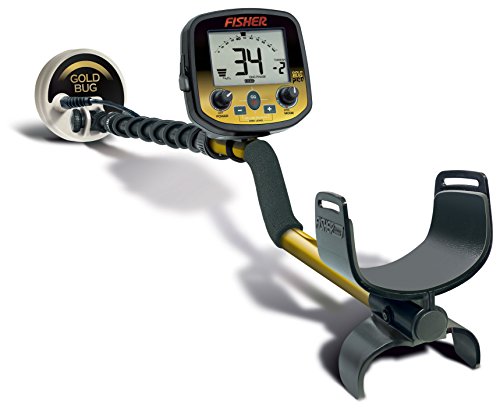
Fisher Gold Bug Pro
Fisher publishes 19 kHz operation, independent threshold and gain control, real-time Ground Grab balancing and a live mineralisation readout on the Gold Bug Pro, which is the exact control set this kind of ground demands.
Price was accurate when this page was compiled and changes often.
On this page
Why does 19 kHz change how you set the machine?
Operating frequency decides what a detector is sensitive to. Higher frequencies respond better to small, low-conductivity targets: fine gold, small jewellery, thin foil. Lower frequencies favour large, high-conductivity targets like silver coins. Fisher runs the Gold Bug Pro at 19 kHz, which puts it firmly in the small-target camp.
The consequence for settings is that this machine hears things a coin detector ignores, including a great deal of ground noise. Higher frequencies also couple more strongly to mineralised soil, which is why the Gold Bug Pro has a proper ground balance system and a live mineralisation readout while a park machine does not. You are not setting gain against your patience here. You are setting it against the soil.
The other consequence is on the target ID. The manual specifies a two-digit numeric target ID for the Gold Bug Pro, and at 19 kHz small gold reads low, in the same region as foil. There is no number that means gold. Anyone who tells you otherwise has not dug enough foil.
What settings suit each kind of ground?
Gain is expressed as a position in the range rather than a fixed number, because the correct absolute value is a property of your soil, not of the machine.
Across every ground type the Gold Bug Pro wants the highest gain that keeps the threshold smooth, and on hot mineralised goldfields that is often several steps below what the same machine tolerates in a park.
| Ground or site | Mode | Gain | Threshold and V-Break |
|---|---|---|---|
| Known goldfield, hot ground | All metal | Mid, raised until threshold roughens | Threshold just audible. Discrimination off |
| Goldfield, mild ground | All metal | Upper range | Threshold just audible. Discrimination off |
| Mineralised relic site | Disc with V-Break set low | Mid to upper | Break point just above the iron grunt |
| Old house site, heavy iron | Disc with V-Break set low | Mid | Keep iron audible. You need to hear it to avoid it |
| Trashy park | Disc, V-Break higher | Upper range | Break point above the foil band |
| Beach, dry sand | All metal or low disc | Mid to upper | Re-balance often as sand moisture changes |
| Beach, wet salt sand | Disc | Lower range | Salt is the limit here. This is not a salt machine |
| Ploughed field | All metal | Mid | Broken ground is noisy. Balance frequently |
Fisher publishes gain, threshold, Ground Grab balancing and V-Break as Gold Bug Pro controls. The positions here are owner practice and should always be reduced until the threshold runs smooth on your ground.
How should you set threshold and gain together?
Threshold is the faint continuous hum the machine makes with nothing under the coil, and on a gold machine it is not optional. Deep and small targets announce themselves as a brief change in that hum long before they produce a clean beep, so a silent machine is a machine that has thrown away its faintest signals. Set the threshold just barely audible, at the level where you would notice it stopping.
Gain is receiver amplification. Raise it until the threshold starts to roughen or break up as you sweep clean ground, then come back one or two steps. Fisher gives you these as independent controls specifically so you can do this, and the combination is what defines the machine: a smooth audible threshold at the highest gain your dirt tolerates.
Ground balance ties it together. Fisher's Ground Grab performs real-time balancing with a continuous ground condition readout, and on genuinely variable ground you should re-balance frequently rather than once at the start. If the threshold that was smooth ten minutes ago is now noisy, the ground changed, not the machine.
What does V-Break actually do?
V-Break sets where the tone changes, rather than simply deleting targets. The distinction matters more than it sounds.
Setting the V-Break breakpoint just above the iron grunt keeps every non-ferrous target audible while still letting you hear instantly which signals are iron, which is the setting most relic hunters settle on.
| Breakpoint position | What you hear | Best for | What it costs you |
|---|---|---|---|
| Discrimination off entirely | One tone for everything | Small gold in clean ground | You dig every nail |
| Break just above iron | Iron grunts, everything else sings | Relic and mineralised ground | Almost nothing. The usual choice |
| Break above the foil band | Foil and small gold grunt | Trashy parks and coin hunting | Small gold jewellery, entirely |
| Break high, near the coin band | Only good conductors sing | Coin shooting in dense trash | Gold, brass, lead and most relics |
Fisher describes V-Break as a variable breakpoint tone discrimination system on the Gold Bug Pro. The consequences listed are the direct result of where the breakpoint sits on the conductivity scale.
Is the Gold Bug Pro the right gold machine?
It is the sensible one. At 19 kHz it is sensitive enough for realistic gold in most ground while remaining a genuinely capable relic detector, which means it earns its keep on days when there is no gold to be had. Fisher also keeps it light, at around two and a half pounds, and long days in a goldfield make that matter more than the specification sheet suggests.
If you are chasing the smallest gold specifically, the Fisher Gold Bug 2 runs at 71 kHz with a manual sixteen-turn ground balance and a three-position mineralisation switch, and Fisher sells it with six and ten inch elliptical coils. It has no numeric target ID to speak of, relying on an iron discrimination mode instead, which is the honest trade for that sensitivity. The Teknetics G2+ is the closely related machine at a lower price on an eleven inch DD coil.
For the numbers side of this family see the F75 chart and the Teknetics G2+ chart, and for a completely different approach to mineralised ground the Deus II settings page is worth reading. The guides hub covers technique, and the gold nugget value calculator handles the arithmetic afterwards.
Sources
- Fisher Gold Bug Pro owner’s manual, ground balance, gain, threshold and V-Break sections
- Fisher Research Labs published Gold Bug Pro specification, 19 kHz operating frequency
- Fisher Gold Bug 2 published specification, 71 kHz and 16-turn manual ground balance
Frequently asked questions
What gain should I run on a Fisher Gold Bug Pro?
The highest setting at which the threshold stays smooth while you sweep clean ground. Raise gain until the hum starts to roughen or break, then come back one or two steps. There is no correct absolute number because the limit is set by your soil mineralisation and local electrical noise, not by the machine. Fisher gives independent threshold and gain controls specifically so you can balance them this way.
Should the threshold be audible or silent?
Audible, and only just. On a gold machine the faintest targets announce themselves as a brief change in the threshold hum before they ever produce a clean beep, so running silent throws those signals away. Set it at the level where you would immediately notice it stopping. Many people find it tiring at first and then find they cannot hunt without it.
Does the Gold Bug Pro have a number that identifies gold?
No, and no detector at any price does. Gold is a poor conductor, so small gold reads low on the target ID scale, in the same region as aluminium foil, and larger gold climbs into the pull tab range. At 19 kHz the Gold Bug Pro is very sensitive to those low-conductivity targets, which is exactly why it also finds so much foil. Digging the trash is the price of the gold.
How often should I re-run Ground Grab?
Whenever the threshold that was smooth stops being smooth, and routinely when you move to a new part of a site. Fisher publishes real-time computerised ground balancing with a continuous ground condition and mineralisation readout on this machine, which means re-balancing is quick and there is no reason to ration it. Variable ground can need it every few minutes.
Can I use the Gold Bug Pro on a salt beach?
Poorly. It is a single-frequency 19 kHz machine, and salt water raises the ground signal to a level that forces gain down and costs a great deal of depth. It will work on dry sand above the wrack line. For consistent wet sand and surf hunting, a fully waterproof multi-frequency machine is the correct tool and no setting on this one substitutes for that.
Researched, not professional advice. This page is compiled from published specifications, manuals and owner-review consensus, not hands-on testing. Target ID numbers, depth figures and settings vary with soil chemistry, moisture, target size, depth, orientation and firmware version, so treat every figure here as a starting point and verify it against your own machine's manual and your own ground. As an Amazon Associate we earn from qualifying purchases.